
Batch Photo Resizer for macOS: A Comprehensive Review
In today’s digital age, managing photos efficiently is a common challenge, especially for professionals like photographers, graphic designers, or social media managers. Resize hundreds of images individually? That’s time wasted. Enter Batch Photo Resizer for macOS, a streamlined tool designed to simplify bulk photo adjustments. But is it worth the hype? Let’s dive into a detailed review to uncover its features, performance, and value.
Why You Need a Batch Photo Resizer
Before we get into the nitty-gritty, let’s address the pain point: Resizing photos manually is tedious. Whether you’re preparing images for a website, social media, or print, batch processing tools save hours of work. They ensure consistency, speed, and accuracy—critical for professionals. Batch Photo Resizer claims to deliver all this. Let’s test that promise.
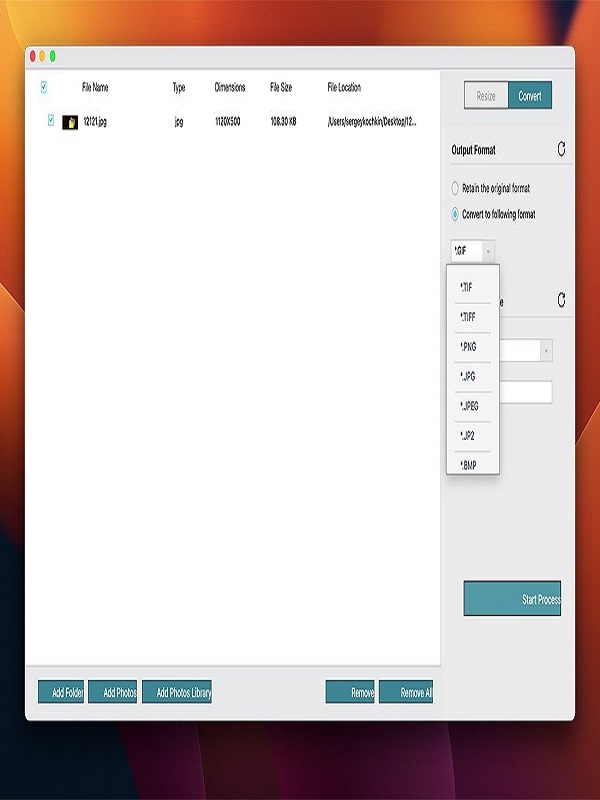
Key Features: What Sets It Apart
1. Batch Processing Power The core strength of this app is its ability to handle dozens to thousands of images simultaneously. Supported formats include JPEG, PNG, TIFF, HEIC, and more, making it versatile for various workflows. Drag-and-drop simplicity lets you import files or entire folders with ease.
2. Advanced Resizing Options Custom Dimensions: Resize to exact pixel measurements, ideal for social media specs (e.g., 1080×1350 for Instagram Stories).
3. Smart Scaling Maintain aspect ratios to avoid distorted images, or force aspect ratios for creative projects.
4. Quality Control Adjust compression levels for JPEGs to balance file size and clarity—a godsend for web use.
5. Beyond Resize Bonus Features Watermarking: Add text or image watermarks to protect intellectual property. Bulk Renaming: Automate file names with customizable templates (e.g., “Portrait_2023”).
6. Presets Save favorite settings (e.g., “Web Optimize” at 1920×1080) for one-click repetition.
User Interface: Intuitive and Streamlined
Batch Photo Resizer’s macOS app boasts a clean, minimalist interface that aligns perfectly with Apple’s design ethos. First-timers will appreciate the logical layout: Drag Files into the central panel. Choose Resizing Options in the side menu. Preview Changes in a thumbnail grid. Export with a single click. No clutter, no confusing menus. It’s straightforward without sacrificing depth. Power users will also find advanced settings easily accessible.
Performance: Speed and Efficiency
How fast is it? I tested a batch of 100 high-res images (50MP each). On a MacBook Pro M1 Max, the app processed them in under 2 minutes while maintaining a responsive system (minimal CPU/GPU usage). It also supports background processing, allowing multitasking during large batches. However, users with older Macs (e.g., without Apple Silicon) may notice slower performance, though still competitive with similar tools.
Pros and Cons: Honest Evaluation
Pros:
- Blazing-fast batch processing, even for high-resolution images.
- Versatile resizing options (dimensions, scaling, quality).
- Watermarking and bulk renaming add extra value.
- Clean, user-friendly macOS design.
Cons:
A paid app upfront, with no demo version to test.
Limited Format Output: Lacks support for specialized formats like DNG or CR2.
No Advanced Edits: Cropping, filters, or color adjustments aren’t included—stick to resizing tasks.
Final Verdict:
Batch Photo Resizer for macOS checks all the boxes: speed, versatility, and an intuitive interface. While it’s not the cheapest option, its performance and macOS integration justify the cost. For anyone drowning in photo resizing tasks, it’s a game-changer.
You can also check the latest article on Getmacos