
A Complete Guide to Unlocking Your Creativity with Clip Studio Paint on macOS
Digital art has revolutionized the way artists work, providing them with new tools to bring their ideas to life. Clip Studio Paint for Mac is one of the best apps for illustrators, animators, and comic producers. It works on many platforms and is quite powerful. It works great on Windows, but macOS users will be happy to know that the software works just as well on Apple’s platform.
What Sets Clip Studio Paint Apart?
CSP, or Clip Studio Paint Download for macOS, is more than just a drawing program; it’s a full suite for making 2D graphics. It has everything from hyper-realistic drawings to manga panels and animations, so it works for both professionals and amateurs. The macOS version keeps all the power of the Windows version while also following Apple’s design style. Some of the most important points are:
- Intuitive Interface: It’s sleek, customizable, and easy to use.
- Advanced Brush Engine: There are thousands of built-in brushes, from digital inks to ones with lots of roughness.
- Comic-Specific Tools: Tools for panel layouts, sound effects, and changing line work.
- Animation Timeline: Frame-by-frame animation with onion skinning to make the transitions smooth.
- Apple Pencil Support: Draw with Apple’s top stylus that responds to pressure.
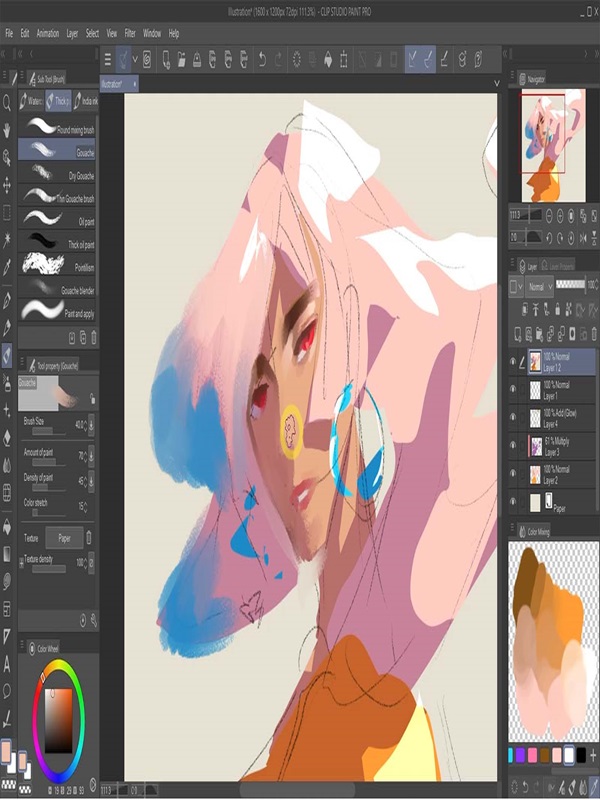
Important Features for Mastering macOS
1. A Drawing Arena, Not Just a Canvas
The macOS version of Clip Studio Paint has a lot of options for customizing, and the panels and menus are made to work best with Apple devices. The app works with Retina display resolution, so every detail is extremely clear. Users may easily drag and drop tools, which makes even the most complicated projects seem easy.
Full-View Mode is a great way to make the most of your workplace. It works great for big pictures or manga panels with a lot of detail.
2. The Brush Engine That Can Do Everything
The brush system from CSP changes the game. You can make your own brushes from scratch or use over 300 brushes that come with the program for free. These brushes can be used to imitate traditional media, such as watercolor, ink, and charcoal.
- Texture Brushes: Use these to add rough textures to your ink or paper.
- Dynamic Pressure and Slope Sensitivity: You may precisely control the weight and opacity of lines.
- Apple Pencil Integration: Get a natural pressure response for a smooth drawing experience.
- Need a certain brush: The Brush Marketplace in Clip Studio Paint (in-app) has thousands of brushes and materials made by other users.
3. Comic and manga tools that are perfect
This is where CSP really shines. macOS users can use tools that are made just for making comics to their maximum potential:
- Panel Layout Assistant: Quickly draw the outlines of complicated grid systems.
- Automatic Raster Lines: Make bold, clear lines for storyboards.
- Sound Effects and Speech Bubbles: You can drag and drop symbols from a library that comes with the program.
- One-Point Perspective Tool: Use a single vanishing point to make things look deeper.
- Pro Workflow: Use these tools with macOS’s AirDrop or Handoff to write comic pages while moving between devices without any problems.
4. Animation for the modern artist
CSP’s timeline lets you make frame-by-frame animations or 2D motion graphics.
- **Onion Skinning**: Change the transparency to line up the frames correctly.
- **Editing Frame by Frame**: Great for stop-motion or hand-drawn techniques.
- ** Layer Locking and Time-Linked Layers: Make complicated animation tasks easier.
You can export your animations in high definition or send them straight to After Effects using CSP plugins.
Performance and stability on macOS
- Clip Studio Paint works best on Apple’s hardware, like M1, M2, and M3 MacBooks and iMacs.
- It works well on macOS 11 and later, using Apple’s Metal graphics framework for rendering in real time.
- Thanks to SSE3 acceleration and good memory management, even projects that use a lot of resources, such as high-resolution animations or pages with hundreds of layers, run smoothly.
Requirements for the system (MacOS):
OS: macOS 11 (Big Sur) or later.
RAM: At least 4GB (8GB is better for animation).
Disk Space: 4GB or more, depending on the project.
Final Decision: Is Clip Studio Paint Good for You?
If you like to paint or ink digitally, make comics or manga, do 2D animation, or work with others, you should definitely try Clip Studio Paint. It has a lot of power, is cheap, and has a lot of polish for Mac, which makes it a top competitor to big companies. Clip Studio Paint on macOS has everything you need to turn your ideas into works of art, no matter how long you’ve been drawing or painting.
You can also check our latest article on GetmacOS