
A Complete Guide to MacDroid: Make Your Android File Transfer Easier
If you have a Mac and an Android phone, you probably know how annoying it is to move files between them. Using a USB cord or cloud storage services, for example, can take a long time and be a pain. But MacDroid macOS Download can make transferring files easier for you. We’ll go over the features, benefits, and uses of this new macOS software in this article.
What is MacDroid?
MacDroid for Mac is a simple program made just for Mac users that makes it easy to move files between their Android devices and Macs. This software was made by a group of professionals to connect the Android and macOS ecosystems. It gives you a smooth and easy way to manage your files.
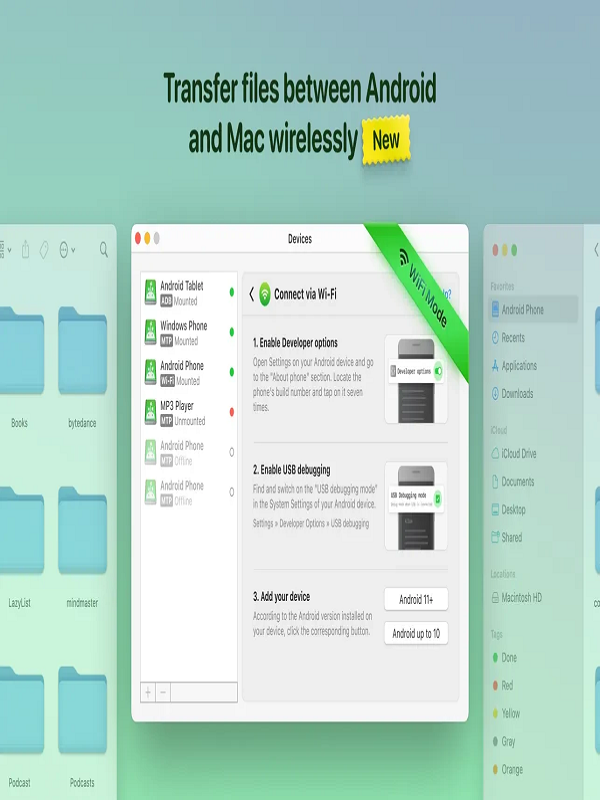
Important Features of MacDroid:
- Access to the Android File System: With MacDroid, you can access and control the file system on your Android device right from your Mac. This implies that it’s easy to look through, copy, and paste files between your devices.
- Transfer files fast and safely between your Mac and Android mobile. MacDroid can handle a wide range of file formats, such as images, movies, audio, and documents.
- Folder Synchronization: MacDroid’s synchronization feature makes sure that your files are always up to date on both devices. This makes sure that any modifications you make to your files on one device show up on the other.
- Device Detection: When you connect your Android device to your Mac, MacDroid automatically finds it. This makes it easy to start transferring files.
- User-Friendly Interface: The software has a clean and easy-to-use interface that makes it simple for people of all ability levels to utilize.
Advantages of MacDroid:
- Convenience: MacDroid makes it easy to transfer files because you don’t need cables, online storage, or other third-party services.
- Speed: The app’s file transmission process is quick and easy, which saves you time and effort.
- Security: MacDroid makes sure that your files are sent safely, keeping your information safe from people who shouldn’t have it.
- Easy File Management: MacDroid makes it easy to keep your files organized and up to date on both devices.
How to Use MacDroid:
Link Your Android Device: You can connect your Android handset to your Mac using a USB cord or over Wi-Fi.
Start MacDroid: On your Mac, open the MacDroid app and follow the instructions to connect your device.
To move files, open the file system on your Android device, choose the files you wish to move, and click the “Transfer” button.
Make folders the same: To keep your data up to date on both devices, set up folder synchronization.
Requirements for the system:
- 10.12 or later versions of macOS
- 4.4 or later device
- USB cable or Wi-Fi connection
Conclusion:
MacDroid is a game-changer for Android users with Macs. It makes it easy, quick, and safe to move files across platforms. MacDroid is a must-have application for anyone who wants to make transferring files easier. It has a simple UI, advanced capabilities, and strong security. If you want to manage your Android files on your Mac easily, MacDroid is a must-have app for students, professionals, and anybody else who knows a lot about technology.
You can also check our latest article on GetmacOS